
An advisor that knows your numbers
Atlas is the AI advisor inside Miles Mosaic. It answers from your own flights, stays and balances and from programme rules we check ourselves.
Atlas is the AI advisor inside a Miles Mosaic account. It answers from the member's own flights, stays and balances and from programme rules that Miles Mosaic checks itself, and it asks before it changes anything. On Explorer, Atlas runs commands (add a flight, look up a balance, check what expires) and answers 10 questions a month in your own words. On Pro you ask in your own words and Atlas answers from your own numbers.
What Atlas is
Atlas sits in a bar at the top of every page of your account. It is an advisor, not a search engine: it works from what is in your account (your programmes, tiers and balances, your flights, stays and trips) and from the rules of the programmes we maintain. Because it knows your numbers, you do not have to explain your situation before you ask.
How it works, in three steps
- Open Atlas. Click the Atlas bar or press Cmd K (Ctrl K on Windows) on any page.
- Type a command or a question. A command starts with a slash:
/add-flight,/balance,/expiring. Type/to see the list. You can also ask in your own words: 10 questions a month on Explorer, and as an everyday tool on Pro. - Check, then confirm. When a command or an answer would add, change or remove something in your account, Atlas shows what it is about to do and waits for you to confirm.
What you see in your first five minutes
On Explorer the bar reads "Ask Atlas, or run a command" while you have questions left this month. Type / and pick one: add a flight without opening a form, look up a balance, or list what expires next. Or ask a question in a sentence: Explorer includes 10 a month. On Pro the bar reads "Ask Atlas or drop your file(s) here": ask a question in a sentence, or drop a booking confirmation and let Atlas read it.
An example
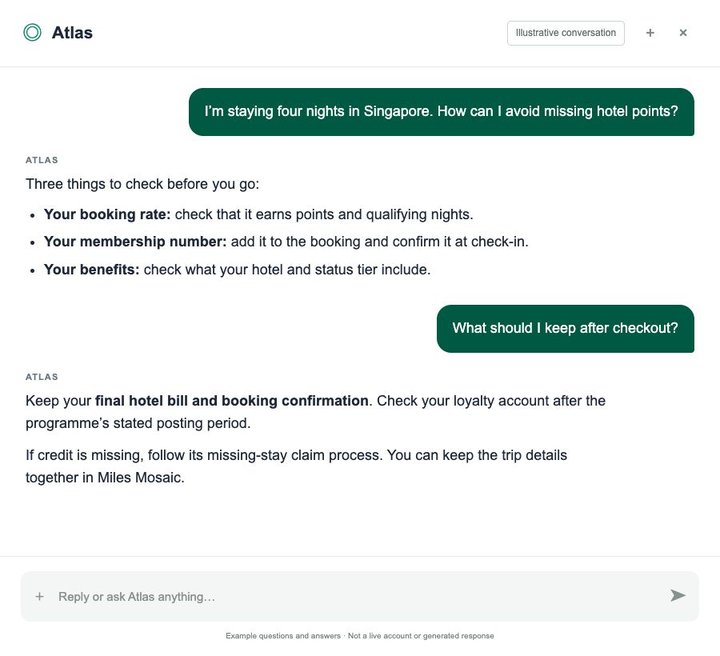
A member notices that a stay in Singapore never showed up in their hotel points. On Pro they ask Atlas in a sentence, and Atlas answers from the stay and the points in their record. The picture above shows a conversation of that kind; it is illustrative, with example questions and answers.
On Explorer the same member could ask the same question as one of the month's 10, or use commands: /balance to see the points on record, and the stay itself to compare.
Where the answers come from
From two places. The first is your own record: the programmes, flights, stays and balances in your account. The second is programme rules that Miles Mosaic checks itself: tiers, qualification thresholds, deadlines and expiry rules, each read from the programme's own pages. Atlas does not see anything you have not added or imported, so if a balance in your account is out of date, the answer will be too.
What is free, and what Pro adds
Explorer, the free plan. On Explorer, Atlas runs commands (add a flight, look up a balance, check what expires) and answers 10 questions a month in your own words.
Pro. On Pro you ask in your own words and Atlas answers from your own numbers, and it remembers the context of the conversation. Pro includes a monthly Atlas allowance, and no more than 100 messages in any one day. Atlas shows when you are close to the allowance, tells you when a limit is reached and says when it resets. Plans and prices are on the pricing page.
Its limits
Atlas advises; it does not book travel or search award seats. It can be wrong, like any AI system, so check a decision that matters against the programme's own page. Status forecasts exist only for the programmes whose rules we maintain. And Atlas never changes your data without asking first.
Best for
- Members who would rather type a command than fill in a form
- Pro members who want an answer worked out from their own flights, stays and balances
- Anyone weighing a next move: where to credit a flight, what expires first, how far a tier is
Not for
- Booking flights or hotels
- Searching award availability
- Questions about programmes and travel that are not in your account
Frequently asked questions
What does Atlas do on each plan?
On Explorer, Atlas runs commands (add a flight, look up a balance, check what expires) and answers 10 questions a month in your own words. On Pro you ask in your own words and Atlas answers from your own numbers. Pro includes a monthly Atlas allowance, and no more than 100 messages in any one day. Atlas shows when you are close to the allowance, tells you when a limit is reached and says when it resets.
Does Atlas change my data without asking?
No. When a command or an answer would add, change or remove something in your account, Atlas shows what it is about to do and waits for you to confirm.
Where do Atlas's answers come from?
From your own record (the programmes, flights, stays and balances in your account) and from programme rules that Miles Mosaic checks itself. Atlas does not see anything you have not added or imported.
Last reviewed .