
You travelled. Make it a keepsake.
Studio turns your flights, stays and trips into cards sized for each social network: a flight board, a trip postcard, a route map and more.
Studio is the part of Miles Mosaic that turns your flights, stays and trips into cards sized for each social network: a flight board, a trip postcard, a route map and more. Every template is part of Explorer, the free plan, and Explorer exports carry a small Miles Mosaic mark. Pro exports are clean, at double resolution, on your own brand kit.
What Studio is
Your travel record is more than numbers. Studio takes a trip, a year or a loyalty moment from your account and lays it out as a card you would want to keep or share. You choose what the card is about and how it looks; Studio fills in the routes, dates, distances and nights from your own record.
How it works, in three steps
- Choose what it is about. A trip, your year, or a loyalty moment. Studio suggests one from your completed travel.
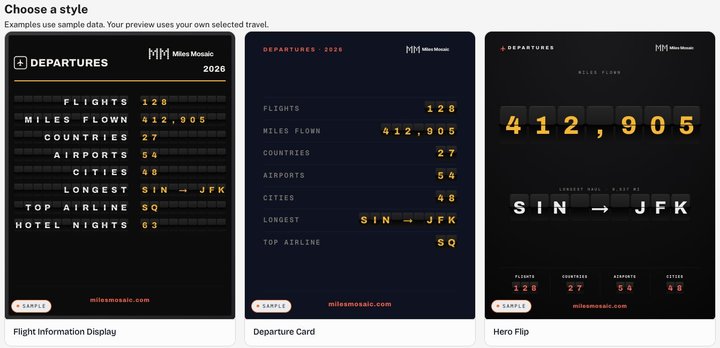
- Choose a style. The gallery shows each style with sample data; your preview uses the travel you selected.
- Save or share. Download the card in the size you need, or share a link. Saved cards stay in your Studio library.
The nine templates
- Trip Postcard. A par-avion keepsake: a generated sky, an airliner on its contrail, your trip in big italics.
- Trip Boarding Pass. A legible, leg-by-leg itinerary with flight numbers, times and stays, plus a tear-off stub.
- Trip Route Map. The real journey on a fitted, labelled map with great-circle arcs, in an editorial, terrain or satellite look.
- Globe Snapshot. Your routes on a photoreal globe, by day or by night.
- Flight Information Display. A full split-flap departures board.
- Departure Card. An editorial departure-card poster with your statistics on split-flap values.
- Hero Flip. One giant split-flap number, your miles flown, with supporting statistics beneath.
- Hotel Postcard. A keepsake of a hotel stay, with your own short note.
- Status Match Result. The status you held, the tier you were granted, and how long it took.
Sizes for each network
Cards export at the size each network expects: Instagram story (1080 x 1920), Instagram post (1080 x 1350) and square (1080 x 1080), Pinterest (1000 x 1500), X (1600 x 900), Facebook (1200 x 630) and LinkedIn (1200 x 627). Not every template comes in every size; the editor lists the sizes a style supports.
An example
A test account that flew from Amsterdam to Bali and back gets this suggestion on opening Studio: a Trip Postcard headed "Bali long weekend", 15,588 miles, "From Amsterdam all the way to Denpasar and back, 4 flights across 3 countries", with seven nights in Bali. Nothing was typed for the card; it was all in the travel record.
What is free, and what Pro adds
Explorer, the free plan, includes all nine templates. Explorer cards carry a small Miles Mosaic mark.
Pro cards are clean, at double resolution, on your own brand kit: your own colours and fonts. Plans and prices are on the pricing page.
Its limits
Studio works from the flights, stays and trips in your account, so it has nothing to draw until you have added or imported some. It makes the card; posting it is up to you. Miles Mosaic does not publish to your social accounts.
Best for
- Travellers who want something to show for a trip or a year of flying
- Anyone who posts travel and wants the right size for each network
- Pro members who want cards on their own brand kit
Not for
- Editing photos: Studio draws from your travel record, not your camera roll
- Scheduling or publishing posts
- Accounts with no flights, stays or trips yet
Frequently asked questions
Is Studio free?
Yes. Every template is part of Explorer, which is free with no time limit. Explorer exports carry a small Miles Mosaic mark. Pro exports are clean, at double resolution, on your own brand kit.
What sizes can I export?
Instagram story (1080 x 1920), Instagram post (1080 x 1350) and square (1080 x 1080), Pinterest (1000 x 1500), X (1600 x 900), Facebook (1200 x 630) and LinkedIn (1200 x 627). The editor lists the sizes each style supports.
Where does the information on a card come from?
From your own travel record: the flights, stays and trips in your account. The gallery examples use sample data; your preview uses the travel you select.
Last reviewed .