
See the story in your travel
Flight insights and stay insights show your year in distance, routes, airlines, cabins, nights and brands. The travel map shows everywhere you have been.
Travel insights in Miles Mosaic turn your recorded flights and stays into a picture of how you travel. Flight insights and stay insights show your year in distance, routes, airlines, cabins, nights and brands. The travel map shows everywhere you have been, and Mosaic Recap turns a year into a story you can share. All of it is part of Explorer, the free plan.
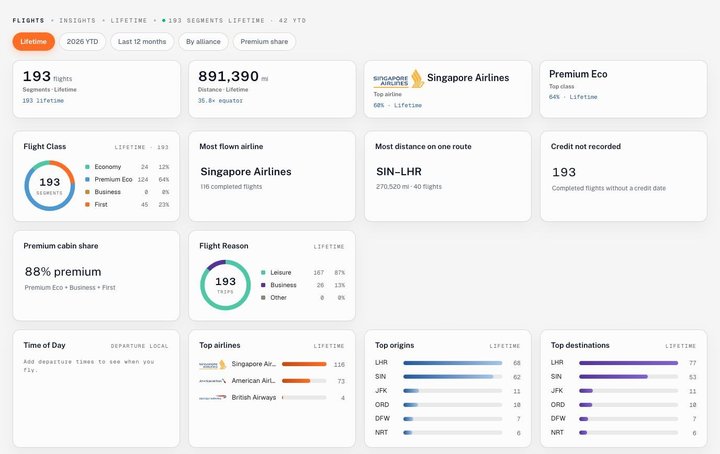
What travel insights are
Four views built from the flights and stays in your account. Flight insights and stay insights count and chart what you have recorded. The travel map draws it. Mosaic Recap tells one year of it as a story. You do not set anything up: each view fills itself in as your record grows.
How it works, in three steps
- Get your travel in. Add flights and stays by hand, forward booking emails, or import your history from the tool you used before.
- Open Insights. There is one under Flights, one under Stays and one under Trips, where the map is.
- Choose the period. Lifetime, this year to date, or the last 12 months.
Flight insights
How much you flew and how: segments and distance (with the distance in trips round the equator), your most flown airline and cabin, the share of flights in a premium cabin, the route you have covered the most distance on, your top origins and destinations, alliance share, flights per month and per year, and this year against last. It also lists the flights with no credit recorded, which is often where missing miles are found.
Stay insights
Nights and stays, the number of different hotels, your top chain, hotels, cities and countries, how long you usually stay, nights by loyalty programme, cash against award nights, the weekdays you check in and out, and this year against last. Nights in upcoming stays are counted separately, so you can see what is still to come.
The travel map and Mosaic Recap
The travel map is under Trips: "Where you've been" on the insights page, with a full map one click away that plots your recorded flights, stays and cities. Mosaic Recap takes one year of the same record and turns it into a short story with a card to share.
An example
A test account with five years of travel shows 403 flights and 1,407,002 miles, which the page puts at 56.5 times round the equator. United is its most flown airline with 224 flights, 64% of its segments were in premium economy, and Singapore to Chicago is the route with the most distance. On the stay side: 579 nights across 141 stays in 70 different hotels, most often for three or four nights.
What is free, and what Pro adds
Explorer, the free plan, includes flight insights, stay insights and the travel map, with unlimited flights and stays, and Mosaic Recap with a small Miles Mosaic mark on its cards.
Pro gives you Mosaic Recap cards without the mark, and is ad-free. The insights themselves are the same on both plans. Plans and prices are on the pricing page.
Where the numbers come from, and their limits
Only from what is in your account: the flights and stays you added, forwarded or imported. A flight you never recorded is not counted, and a chart that needs a detail you did not enter says so (for example, departure times for the time-of-day chart). Stay insights count completed stays. The map is drawn on OpenStreetMap data.
Best for
- Frequent travellers who want to see how they really travel
- Anyone bringing years of history from another tool
- Members checking for flights with no miles credited
Not for
- Live flight tracking: that is on the flight card, not in insights
- Travel you have not recorded or imported
- Expense or tax reporting
Frequently asked questions
Are travel insights free?
Yes. Flight insights, stay insights and the travel map are part of Explorer, which is free with no time limit, with unlimited flights and stays. Mosaic Recap is included too, with a small Miles Mosaic mark on its cards; Pro removes the mark.
How do I get my past travel in?
Add flights and stays by hand, forward booking emails, or import your history from the tool you used before. The pricing page says how many files each plan reads a month.
What periods can I look at?
Lifetime, the current year to date, and the last 12 months. Flight insights can also be split by alliance, and stay insights by region or by award stays only.
Last reviewed .